

Use the below process within Google Tag Manager to track website traffic to the LiveBuzz registration form. The same tracking code used on the website will need to be added to the registration form.
Enable allowLinker
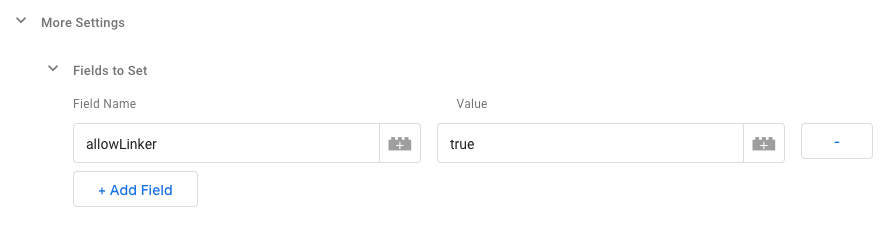 AllowLinker
- Sign in to your Google Tag Manager account
- In the Variables screen:
- Select the ‘Google Analytics settings’ variable
More Settings > Fields to Set- Enter allowLinker (case-sensitive) for the Field Name
- Enter true (case-sensitive) for the Value
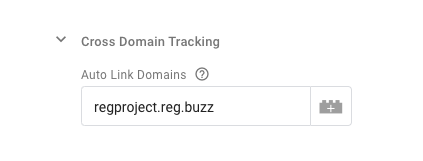
Auto Link Domains
- In the same ‘Google Analytics settings’ variable
- Select
More Settings > Cross domain tracking - Locate the Auto Link Domains field
- In that field, you should enter the registration form domain URL (without 'http://www.')
- Click Save
Referral Exclusion
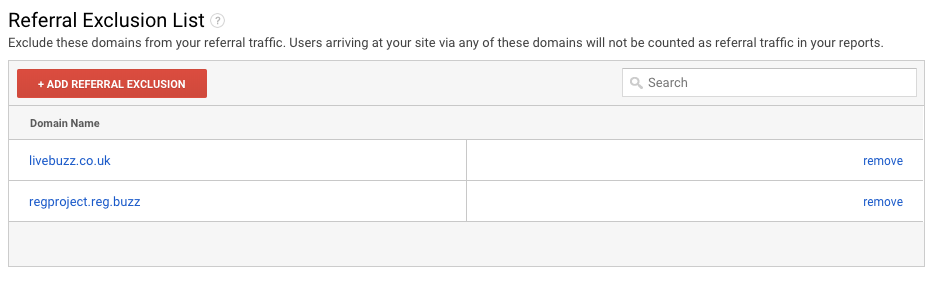
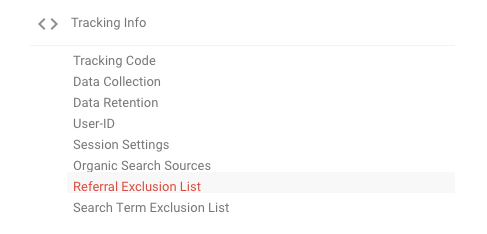 Referral Exclusion List
- In Google Analytics, open the property of your website/project
- Go to
Admin > Tracking Info > Referral Exclusion List - Click on the Add Referral Exclusion button
- Add the registration form domain URL (without 'http://www.')
- Click Create