

In LiveControl you will often see reference to a Customer Status, these status' are often referred to as the Core Status keeping them separate from Cutom Status. These Core Status are the same across all LiveControl event campaigns, whereas Custom Status' allow event by event customisation and variations between events.
In this guide, we will explore the Core Status' in LiveControl and their usual applications.
Core Status Overview
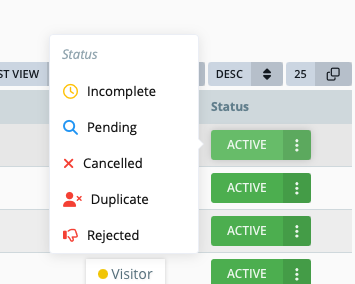
Active - This typically shows that the user has completed the registration process. If payments are required for the event, then this means they have submitted and paid for their order. At this point the user will usually have a badge type and be ready to attend.
Incomplete - In most cases, this will be the starting status for a registration. It shows us that the user has not completed their registration. For a free of charge show, this will usually indicate that they haven't reached the final demographic step. For a show with payments, it will mean they have dropped off somewhere before completing their order.
Pending - A.K.A 'Unpaid' - Pending status will be used on paying shows where it is possible for a user to place an order without paying upfront (Invoice/Bank/Wire Transfer transactions). Pending records are blocked from downloading or printing their badge, making debtors much easier to control. If you're thinking "But what about vetting?", see 'Vetting & Custom Statuses' below.
Cancelled - Setting a registration to cancelled removes the registration from all customer reporting and allows the email address to be used again. It's typically used for test registrations but can also be used on genuine registrations should they need to re-register for some reason. Cancelled registrations are unable to collect their badge.
Rejected - Just like the cancelled status, the rejected status removes the record from reporting and prevents the user from collecting their badge. The key difference is that a rejected status will not allow the email address to be used again so in-essence it prevents re-registration. This is used if the user has not hit the criteria to attend.
Duplicate - This status is usually set by the data team during the postshow clean/dedupe. If there are duplicate records, the 'best quality' record is retained. For example if two registrations are identical, but one was used at the event so is an attendee, that record is retained and the other set to the duplicate status.

Vetting & Custom Statuses
Custom status' are defined on a campaign by campaign basis meaning they are unique to each edition of an event. Custom Status' are used to afford more flexibility to a process and allow different stages to a registration. They can be named whatever they need to be to define a process / stage. Here's an example set of custom status' for a vetting process: