

The Menu Manager is where you create and control the navigation structure of your LiveWeb site. From here, you can manage your menus, add or edit menu items, and control how users navigate through your website pages.
What is a Menu?
A menu is a collection of menu items — links that direct visitors to different parts of your website, such as articles, contact forms, galleries, or external pages.
- Menus are usually displayed in navigation areas like headers, footers, or sidebars.
- You can have multiple menus (e.g. Main Menu, Quick Links, Footer Links) to organise different types of links.
Accessing the Menu Manager
- Log in to your LiveWeb admin panel.
- Go to
Menus > All Menu Items. - You’ll see a list of all your existing menus and their associated items.
Understanding the Menu Manager Interface
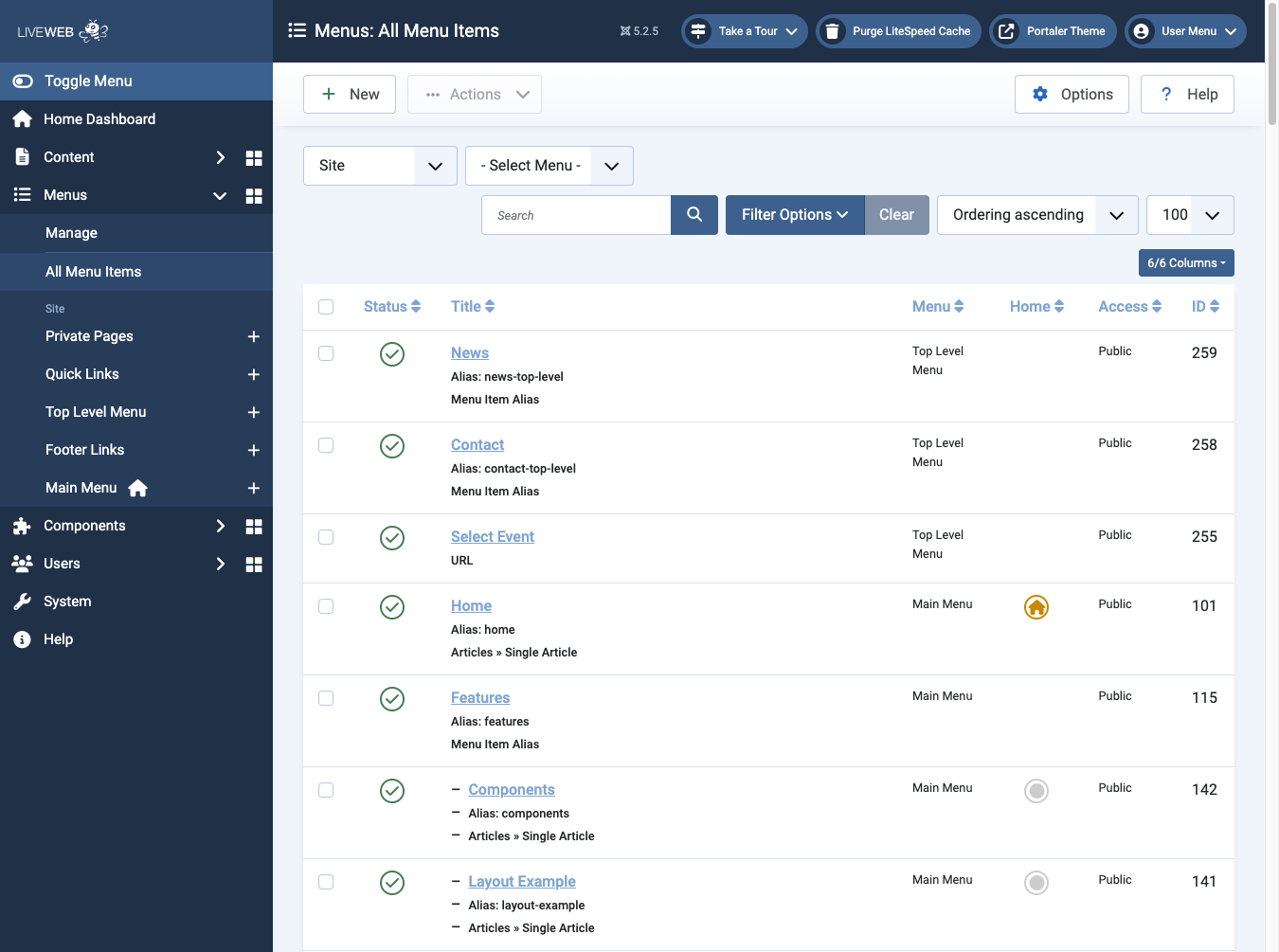 The menu manager can be accessed by selecting a menu, or selecting All Menu Items
In the Menu Manager, you’ll see:
- Status – Published, unpublished, or trashed.
- Title – The name of the menu item (what users see on the website).
- Menu – Which menu this item belongs to (e.g., Main Menu).
- Home - Set the home page (visible with a yellow house icon).
- Access – Who can view the menu item (e.g., Public, Registered).
- ID - The unique identifier for the menu item.
Tip
You can use the filters and search bar to quickly locate specific menu items.